Ok, so last night I was trying to help my wife with something in Amarok. She has made a few playlists that she uses for her dance classes, and was looking for a simple way to transfer the songs in the playlist to her media player. I was shocked to discover that this feature had not yet made its way into Amarok 2.
After some digging around, I found that there was a way to do this via Amarok scripting, and in fact someone had written and posted one online. It is available using the GHNS feature in Amarok under the Script Manager, and is called "Copy Selected Files" (search under most downloaded).
For those not familiar with how to add and/or enable these scripts, please have a look at the quick video below. I didn't add any audio, but the visual should be enough.
Showing posts with label kde. Show all posts
Showing posts with label kde. Show all posts
Tuesday, November 24, 2009
Tuesday, November 3, 2009
Have a Dell Laptop and want Kubuntu with Recovery Partition...
Well, I recently purchased a Dell Mini 10v, and wanted to have Kubuntu 9.10 on it. I purchased it with Ubuntu, but it came with Ubuntu 8.04, and it was the lpia version. Neither of these appealed to me, however, the Dell recovery partition did. So, I set out trying to find a way to get Kubuntu on there with a recovery partition.
Thanks to Mario Limonciello (superm1), who works for Dell, I was able to get a process that more or less works, and gives me a recovery option for Kubuntu 9.10.
Here's basically what you need to do.
1) Download the DVD iso for Kubuntu Karmic 9.10 to your system.
2) Visit https://launchpad.net/dell-recovery/+download and grab the latest dell-recovery deb (at least version 0.27) for Karmic and install it from any Karmic system (gdebi can be used here). This will not work from a live CD/DVD as the process requires a lot of temportary space to work with, so you must be in a working Karmic install (Ubuntu, Kubuntu, etc).
3) Now, run the dell-recovery-media program as follows:
dell-recovery-media --builder
The --builder option is a recent addition by Mario, which allows building Dell recovery media from any Ubuntu ISO, so it will work with Kubuntu, with a few tweaks.
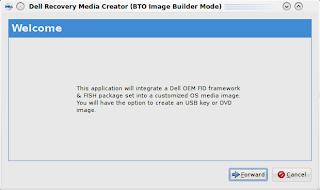
4) Click the Forward button and you are given an opportunity to choose the ISO to build the Dell image from.
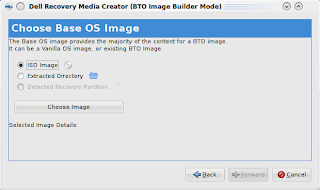
Click on Choose Image and select the Kubuntu DVD iso you downloaded earlier.
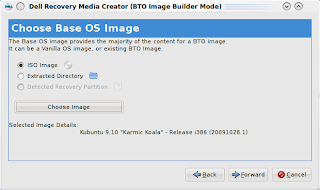
The screen will update and show some details about the image (which should show Kubuntu Karmic 9.10).
5) Click the Forward button, and hit Fetch/Update GIT Tree.
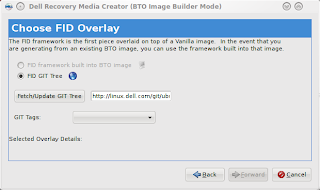
This may take a few minutes to complete.
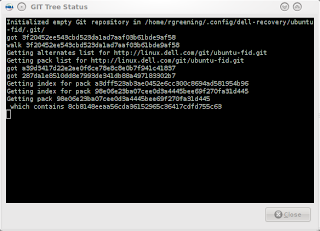
Once the fetch is completed, hit the Close button in the GIT Tree Status window. From the GIT Tags drop down, select Origin/Master.
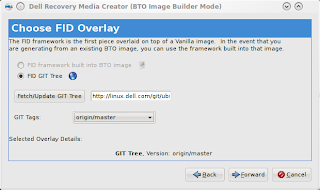
6) Click the Forward button to go to the FISH screen. This allows you to add additional packages to the install process. We are going to skip this for now (I may expand on this in a future post).
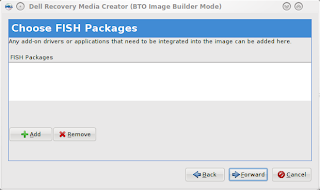
7) Click the Forward button and choose to create a USB Flash Drive
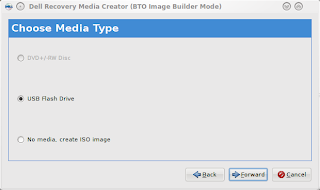
8) Click the Forward button and enter a version number (I chose K00 for Kubuntu ), then click Apply.
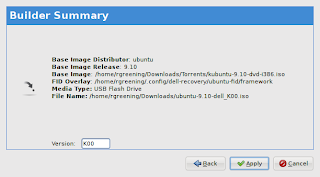
Enter your password when prompted to Authenticate. The program will now start building the new ISO to copy to the USB Stick.

9) This will then launch the usb-creator application. At this point, you should be able to simply click Make Startup Disk (See some of my previous blog entries about usb-creator-kde for more info about this).
10) After the startup disk completes installing, you can close it and the Dell Recovery window which pops up after.
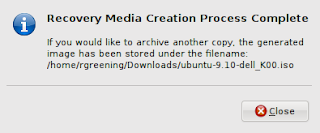
11) The last step you need to perform is to remove the del-recovery deb from the newly created USB Startup Disk, as it is gtk based, and has some additional deps that are not found on the default install media and will thus fail during the install process. Assuming the mount point for the media stick is /media/disk, you would preform the following command to remove this file:
rm /media/disk/debs/main/dell-recovery_*_all.deb
12) It is now safe to unmount the USB Stick or reboot if you wish to install from it now.
13) After you install the new dell image, you should re-install the dell-revocery application. Unfortunately, one of the deps is currently missing from the package. To get around this, you will need to install policykit-1-gnome as follows:
sudo apt-get install policykit-1-gnome
Then use gdebi to install dell-recovery, which you downloaded (refer to step 2 for the link).
14) Now, you can use dell-recovery-media to rebuild the ISO from the recovery partition and make as many USB disks or ISO's as you want. As well, you can now access the restore option in grub (hold space bar during boot to expose the boot options).
I hope this is useful to you. I will be working with Mario to see how hard it would be to create a Qt/KDE front-end for the dell-recovery package, so that we can avoid having to remove anything.
Thanks to Mario Limonciello (superm1), who works for Dell, I was able to get a process that more or less works, and gives me a recovery option for Kubuntu 9.10.
Here's basically what you need to do.
1) Download the DVD iso for Kubuntu Karmic 9.10 to your system.
2) Visit https://launchpad.net/dell-recovery/+download and grab the latest dell-recovery deb (at least version 0.27) for Karmic and install it from any Karmic system (gdebi can be used here). This will not work from a live CD/DVD as the process requires a lot of temportary space to work with, so you must be in a working Karmic install (Ubuntu, Kubuntu, etc).
3) Now, run the dell-recovery-media program as follows:
dell-recovery-media --builder
The --builder option is a recent addition by Mario, which allows building Dell recovery media from any Ubuntu ISO, so it will work with Kubuntu, with a few tweaks.

4) Click the Forward button and you are given an opportunity to choose the ISO to build the Dell image from.

Click on Choose Image and select the Kubuntu DVD iso you downloaded earlier.

The screen will update and show some details about the image (which should show Kubuntu Karmic 9.10).
5) Click the Forward button, and hit Fetch/Update GIT Tree.

This may take a few minutes to complete.

Once the fetch is completed, hit the Close button in the GIT Tree Status window. From the GIT Tags drop down, select Origin/Master.

6) Click the Forward button to go to the FISH screen. This allows you to add additional packages to the install process. We are going to skip this for now (I may expand on this in a future post).

7) Click the Forward button and choose to create a USB Flash Drive

8) Click the Forward button and enter a version number (I chose K00 for Kubuntu ), then click Apply.

Enter your password when prompted to Authenticate. The program will now start building the new ISO to copy to the USB Stick.

9) This will then launch the usb-creator application. At this point, you should be able to simply click Make Startup Disk (See some of my previous blog entries about usb-creator-kde for more info about this).
10) After the startup disk completes installing, you can close it and the Dell Recovery window which pops up after.

11) The last step you need to perform is to remove the del-recovery deb from the newly created USB Startup Disk, as it is gtk based, and has some additional deps that are not found on the default install media and will thus fail during the install process. Assuming the mount point for the media stick is /media/disk, you would preform the following command to remove this file:
rm /media/disk/debs/main/dell-recovery_*_all.deb
12) It is now safe to unmount the USB Stick or reboot if you wish to install from it now.
13) After you install the new dell image, you should re-install the dell-revocery application. Unfortunately, one of the deps is currently missing from the package. To get around this, you will need to install policykit-1-gnome as follows:
sudo apt-get install policykit-1-gnome
Then use gdebi to install dell-recovery, which you downloaded (refer to step 2 for the link).
14) Now, you can use dell-recovery-media to rebuild the ISO from the recovery partition and make as many USB disks or ISO's as you want. As well, you can now access the restore option in grub (hold space bar during boot to expose the boot options).
I hope this is useful to you. I will be working with Mario to see how hard it would be to create a Qt/KDE front-end for the dell-recovery package, so that we can avoid having to remove anything.
Monday, October 5, 2009
Arora 0.10 in Kubuntu 9.10
For anyone looking to try out a lightweight browser under KDE (or even Gnome for that matter), they should definately give Arora a test run.
For the upcoming Karmic Koala release, we have worked very closely with the upstream Arora developers to ensure we have a nicely integrated browser, which can serve as an alternative to the default system browser.
For example, in this release, we see AdBlock support as well as wallet (password/form autofill) support. This was missing in the 0.9 and earlier series, and was definately a feature I missed when testing out this, otherwise, fantastic browser.
Now that it has the wallet and AdBlock features, I can heartily recommend that everyone give it a serious try. If you find the default system browser doesn't work on some of your favorite sites or you find Firefox to be a bit bloated, then you will surely love Arora.
Check out www.kubuntu.org for details on downloading the new Karmic Koala beta or if you already have the beta running, simply install Arora in Add/Remove software.
To find out more about Arora, please see www.arora-browser.org.
For the upcoming Karmic Koala release, we have worked very closely with the upstream Arora developers to ensure we have a nicely integrated browser, which can serve as an alternative to the default system browser.
For example, in this release, we see AdBlock support as well as wallet (password/form autofill) support. This was missing in the 0.9 and earlier series, and was definately a feature I missed when testing out this, otherwise, fantastic browser.
Now that it has the wallet and AdBlock features, I can heartily recommend that everyone give it a serious try. If you find the default system browser doesn't work on some of your favorite sites or you find Firefox to be a bit bloated, then you will surely love Arora.
Check out www.kubuntu.org for details on downloading the new Karmic Koala beta or if you already have the beta running, simply install Arora in Add/Remove software.
To find out more about Arora, please see www.arora-browser.org.
Wednesday, July 15, 2009
I'm an Uncle...
So, my sister finally had her baby on July 9th - a whopping 11lb 13oz boy.
Baby, Hunter Jaxon, is 22.5in long, and I swear will be walking in no time. :)
Anyway, just wanted to share my joy with everyone. I guess, I'll be spending some time with my new nephew over the coming weeks, so I may not be as active developing over the next couple of weeks.
Anyway, things should get back to normal soon.
Here's a pic of me and Hunter:

Tuesday, July 7, 2009
usb-creator-kde - available for testing
So, I meant to post this up a couple of weeks ago... better late than never.
I have posted an early beta copy of usb-creator package in my PPA. It contains packages for both the gtk and kde front-ends and a common package, which contains the back-end, and some other common bits.
If you are interested in trialing the beta, feel free to download the debs or add my PPA to your sources.list (if you add it to your list, please read the warning on my PPA page).
To get the files, navigate here.
Here are some screenshots showing the kde front-end in action. Enjoy!


I have posted an early beta copy of usb-creator package in my PPA. It contains packages for both the gtk and kde front-ends and a common package, which contains the back-end, and some other common bits.
If you are interested in trialing the beta, feel free to download the debs or add my PPA to your sources.list (if you add it to your list, please read the warning on my PPA page).
To get the files, navigate here.
Here are some screenshots showing the kde front-end in action. Enjoy!


Wednesday, June 17, 2009
usb-creator-kde - in action and with icons...
Here's a new screenshot showing usb-creator-kde with media detected and some icon bling (icons subject to change).
Basically, I updated the ui elements from QPushButton to KPushButton and assigned icons as KIcons based on appropriate icon/button functions. So they should change with the icon theme - yay.
Anyway, here it is...

usb-creator-kde - adventures in gobject land
I'll first start out with a disclaimer: I am not fluent in Qt nor Gtk programming. What I know or have learned is through the internet, various books and reading others code. So, what I describe below may not be the best way to achieve the end result, but it appears to work and allow for minimal interference with an existing application backend.
Now that that's out of the way, I'll proceed with the discussion: porting gobject calls to Qt so that I can get a usable KDE/Qt frontend for usb-creator-kde.
Now that that's out of the way, I'll proceed with the discussion: porting gobject calls to Qt so that I can get a usable KDE/Qt frontend for usb-creator-kde.
For the gtk client (usb-creator), the backend currently implements timers, callbacks, and process watchers via gobject. Similar mechanisms exist for Qt. The current backend is unsuitable for general use by both a gtk and Qt frontend as gobject and Qt seem to tromp all over one another, and cause the frontend to crash. TO get around this, we need to move the gobect calls to the gtk frontend, and implement wrappers that the backend can call from the frontend. Once we have wrappers in place, we can then re-implement the wrappers in our desired frontend (e.g. PyKDE).
Here's an example of some code from the backend:
self.timeouts[udi] = gobject.timeout_add(UPDATE_FREE_INTERVAL, self.update_free, udi)
And from the PyGtk manual:
timeout_addint timeout_add(int interval, callback callback [, mixed user_data1, ... ]);Registers a function to be called periodically. The function will be called repeatedly after interval milliseconds until it returns false (or nothing) at which point the timeout is destroyed and will not be called again.So to keep the timeout alive, your callback function needs to return true;
Unfortunately, there is no single call in Qt that provides this mechanism (none that I know of). So, to implement this, I needed to write a couple of functions, using unnamed arguments lists, lambda notation, etc.
First off, we need a generic timer callback function that will call our passed function, test the return value, and stop the timer if the return value is not True. I also want this function to be private to my frontend class. Here what it looks like:
def __timeout_callback(self, func, *args):'''Private callback wrapper used by add_timeout'''timer = self.sender()active = func(*args)if not active:timer.stop()
So, func is the passed calback function to execute, followed by a list of optional arguments *args. The sender will be a timer object, which we get from self.sender, assuming that the parent is some QObject or derivation thereof (in my case, the frontend class KdeFrontend is derived from QObject).
Ok, that allows us to have an arbitrary function with any number of arguments, and have it stop a timer when appropriate. We now need to implement the public wrapper that will use this private callback. Here is the code for that:
def add_timeout(self, interval, func, *args):'''Add a new timer for function 'func' with optional arguments. Mirrors asimilar gobject call timeout_add.'''timer = QTimer()QObject.connect(timer,SIGNAL("timeout()"),lambda: self.__timeout_callback(func, *args))timer.start(interval)return timer
The add_timeout function takes the same parameters as the gobject.timeout_add function. Inside, we setup a new timer, connect it to our private callback, start the timer and return a reference to it. The magic is in how we connect the passed function func. Notice that we use lambda to call our private callback, passing along the func and *args. Normally, you do not pass a function with variable parameters to Qt connect statements, but in our case, we absolutely are required to do so. This is where using lambda comes in handy.
So, there you have it. A way to implement gobject.timeout_add using Qt. While everyday use of this is not likely, it will certainly help in porting applications from PyGtk to PyQt. I hope someone out there finds this useful. I know I searched for an easy way to do this, and never found anything. After lots of trial and error and asking lots of questions to my fellow developers, I was able to come up with the above.
Cheers.
Tuesday, June 16, 2009
usb-creator-kde - update and screenie
The creator is steadily moving along. Right now the main stumbling blocks are gobject calls in the backend and the use of a DBusGMainLoop in the backend.
Together, these constitute a non-working backend for PyKDE/PyQt. KCrash has become a nightmare.
In order to get around this, we need to pull out the gobject and DBusGMainLoop and move them somewhere related to the frontend. At that point I can re-implement the bits I require as PyKDE/PyQt code, while maintaining a common backend code base.
I've taken the first step, and moved DBusGMainLoop to the gtk frontend via a wrapper. I have re-implemented similar functionality via the same wrapper in the kde frontend using DBusQtMainLoop.
Next on the list is to rip out the gobject calls... I suspect a couple of days before I get that all figured out... (unless I get a real dose of inspiration).
Anyway, here's the screenshot as promised, so you know it's not all pie-in-the-sky :)

Together, these constitute a non-working backend for PyKDE/PyQt. KCrash has become a nightmare.
In order to get around this, we need to pull out the gobject and DBusGMainLoop and move them somewhere related to the frontend. At that point I can re-implement the bits I require as PyKDE/PyQt code, while maintaining a common backend code base.
I've taken the first step, and moved DBusGMainLoop to the gtk frontend via a wrapper. I have re-implemented similar functionality via the same wrapper in the kde frontend using DBusQtMainLoop.
Next on the list is to rip out the gobject calls... I suspect a couple of days before I get that all figured out... (unless I get a real dose of inspiration).
Anyway, here's the screenshot as promised, so you know it's not all pie-in-the-sky :)

Monday, June 15, 2009
usb-creator-kde... for karmic
So, during UDS, the Kubuntu team decided it would be nice to work on making Kubuntu easier to install on netbooks.
The are several things that need to be adjusted to make the netbook experience enjoyable, but the first real thing required is a native client for putting a Kubuntu desktop image into a usb stick.
There already exists a PyGtk front-end, but no PyKDE one. At UDS I decided to take on the task of porting the existing PyGTK client to PyKDE.
At this point, I have ported much of the required code base to support a native client for Kubuntu. There are still some bugs to fix, and some of the new code for the PyGTK front-end does not yet work 100%, and hence neither does the PyKDE front-end.
If anyone is interested in looking at the code and feels like offering advice, it can be found here: https://launchpad.net/usb-creator
To check out the code: bzr branch lp:usb-creator
Anyway, I am working closely with the usb-creator team, and hope to get this working/completed within the next couple of weeks.
Thanks to all who have helped thus far.
The are several things that need to be adjusted to make the netbook experience enjoyable, but the first real thing required is a native client for putting a Kubuntu desktop image into a usb stick.
There already exists a PyGtk front-end, but no PyKDE one. At UDS I decided to take on the task of porting the existing PyGTK client to PyKDE.
At this point, I have ported much of the required code base to support a native client for Kubuntu. There are still some bugs to fix, and some of the new code for the PyGTK front-end does not yet work 100%, and hence neither does the PyKDE front-end.
If anyone is interested in looking at the code and feels like offering advice, it can be found here: https://launchpad.net/usb-creator
To check out the code: bzr branch lp:usb-creator
Anyway, I am working closely with the usb-creator team, and hope to get this working/completed within the next couple of weeks.
Thanks to all who have helped thus far.
Saturday, May 23, 2009
Where have I Been?
Wow, I can't believe it's been about 5 months since I last blogged. That will tell you how hectic my life has been lately.
What's been happening? Well, for one, I'm about to be an uncle... my little sister is having a baby due in less than 7 weeks. I think I am almost as excited as she is! :) I can't wait to spoil the little tyke .. hahah!
Besides that, I have been really busy with work. We are undergoing some changes, and as a result, it has pulled me away from my normal Kubuntu packaging. However, I now have things mostly back in order, and am back to my packaging duties.
Finally, I am typing this at the airport, on my way to UDS Barcelona. I think this trip will be much more interesting than the California one, and definately hotter. I don't think I packed enough shorts... :)
Anyway, here's to hoping I have more time to blog and more frequently.
What's been happening? Well, for one, I'm about to be an uncle... my little sister is having a baby due in less than 7 weeks. I think I am almost as excited as she is! :) I can't wait to spoil the little tyke .. hahah!
Besides that, I have been really busy with work. We are undergoing some changes, and as a result, it has pulled me away from my normal Kubuntu packaging. However, I now have things mostly back in order, and am back to my packaging duties.
Finally, I am typing this at the airport, on my way to UDS Barcelona. I think this trip will be much more interesting than the California one, and definately hotter. I don't think I packed enough shorts... :)
Anyway, here's to hoping I have more time to blog and more frequently.
Wednesday, November 26, 2008
My recent development work... aka training excercise
I recently began to dabble with Python, and I am really starting to like the language. It is quite powerful, and intuitive, and allows for some really rapid development, especially when coupled with pyKDE4 (KDE Python bindings).
I was originally trained as a programmer, primarily using C/C++. However, in more recent years, I have been mostly programming in bash and perl, all under work related coding.
With my recent involvement with Kubuntu, I have felt it necessary to learn python, as many of its support applications are written in that language. So, what better way to learn than jump right into a new project. That's where todays post comes from...
I have recently submitted two new projects to Launchpad, with the following two goals:
1. teach myself python and pyKDE
2. hopefully fill a gap within Kubuntu in time for Jaunty
At this point in time, the projects are mere shells/placeholders, and really do not do anything useful besides provide a tray icon and a main window and help dialog. However, this is all a part of the learning process, and more code will appear as I test out various things.
So, what are these two projects? Well, the first is ufw-kde, a graphical interface to the Uncomplicated Firewall. The second is clamav-kde, a replacement for Klamav, which has yet to be ported to KDE4.
Anyway, my primary goal is learning python and kde programming via the python bindings. If these do indeed turn out to be useful in their own right, then that's awesome too.
If anyone is interested in help out on either project, feel free to contact me.
I was originally trained as a programmer, primarily using C/C++. However, in more recent years, I have been mostly programming in bash and perl, all under work related coding.
With my recent involvement with Kubuntu, I have felt it necessary to learn python, as many of its support applications are written in that language. So, what better way to learn than jump right into a new project. That's where todays post comes from...
I have recently submitted two new projects to Launchpad, with the following two goals:
1. teach myself python and pyKDE
2. hopefully fill a gap within Kubuntu in time for Jaunty
At this point in time, the projects are mere shells/placeholders, and really do not do anything useful besides provide a tray icon and a main window and help dialog. However, this is all a part of the learning process, and more code will appear as I test out various things.
So, what are these two projects? Well, the first is ufw-kde, a graphical interface to the Uncomplicated Firewall. The second is clamav-kde, a replacement for Klamav, which has yet to be ported to KDE4.
Anyway, my primary goal is learning python and kde programming via the python bindings. If these do indeed turn out to be useful in their own right, then that's awesome too.
If anyone is interested in help out on either project, feel free to contact me.
Monday, November 3, 2008
KDE-Nightly (Neon) - For the Thrill Seeker in You
Well, thanks to Harold (apachelogger) our resident packaging savant, we have the ability to test drive KDE 4.2 trunk daily. Remember, this is trunk we are dealing with and many things break, and possibly break quite often and maybe for extended periods of time. For this reason, you should never install this on your production machine.
I decided to give this a test drive, and figured the best way to do so was via a VM. So, I installed Virtualbox first and set it up. I won't go over all the details here, as there are a wide variety of docs available for setting up virtual box (aka google for it).
Once I had a VM drive all setup and installed with the latest Intrepid, added the KDE Nightly Neon repository (the PPA for KDE Nightly) to a new sources.list.d/neon.list file. The PPA is enabled by adding this entry:
deb http://ppa.launchpad.net/project-neon/ubuntu intrepid main
The next thing you need is to update your repositories package info. Either using your favorite package manager, and hit their update option, or from the command line execute the following:
sudo apt-get update
Now, you should have an updated package list which contains the Neon packages.
Next, using your package manager, locate the kde-nightly package and select/mark it for installation and apply it or execute the following from the command line:
sudo apt-get install kde-nightly
This will install the required files and setup a new kdm xsession for KDE Nightly (Neon). Once you logout and end up back to KDM, you can choose this new session (rather than the default KDE session).
Reference post can be found here.
Many thanks to apachelogger for this.
I decided to give this a test drive, and figured the best way to do so was via a VM. So, I installed Virtualbox first and set it up. I won't go over all the details here, as there are a wide variety of docs available for setting up virtual box (aka google for it).
Once I had a VM drive all setup and installed with the latest Intrepid, added the KDE Nightly Neon repository (the PPA for KDE Nightly) to a new sources.list.d/neon.list file. The PPA is enabled by adding this entry:
deb http://ppa.launchpad.net/project-neon/ubuntu intrepid main
The next thing you need is to update your repositories package info. Either using your favorite package manager, and hit their update option, or from the command line execute the following:
sudo apt-get update
Now, you should have an updated package list which contains the Neon packages.
Next, using your package manager, locate the kde-nightly package and select/mark it for installation and apply it or execute the following from the command line:
sudo apt-get install kde-nightly
This will install the required files and setup a new kdm xsession for KDE Nightly (Neon). Once you logout and end up back to KDM, you can choose this new session (rather than the default KDE session).
Reference post can be found here.
Many thanks to apachelogger for this.
Friday, October 31, 2008
Upcoming KDE 4.1.3 release.... Nov 5th
Well, the Kubuntu team has had a busy night/day, packaging KDE 4.1.3 in preparation for release into intrepid-updates. KDE tagged 4.1.3 on October 29th, in preparation for the November 5th release. I'm pleased to say we are way ahead of the game, after the last 24 hour stint in package building and testing.
It's not like we had an easy time either, what with this coinciding with the Intrepid release and all. The mirrors were completely bogged down, and a few of the team had issues finding a mirror suitable to download from. Luckily, I had a great up-link and a close east coast mirror to work with.
Anyway, the packaging is pretty much completed, we just need to build the stack, test and then deploy to the updates queue. This should coincide with the KDE release date of November 5th, if all goes according to plan. It's a lot to take in, a new Kubuntu release immediately followed by an update to KDE, and a great team to pull it all together.
Thursday, October 30, 2008
Kubuntu Intrepid and Desktop Notifications
For those that aren't aware, Intrepid Ibex is just about ready to hit the streets (sometime Thursday). There have been a lot of changes in this release, and the Kubuntu desktop has had its share, including the switch to KDE 4.1. However, this post isn't about the new release, but rather a new application within this release, called update-notifier-kde.
The app was written by our friend Jonathan Riddell, and has been steadily improved upon by members of the Kubuntu team.
What is update-notifier-kde? It's a small python app that sits in your system tray and monitors your system for updates, crash logs, reboot requests, and other notifications. It integrates tightly with adept/apt, apport, and package update hooks.
Providing the user with useful feedback is very important to the whole desktop experience, and this app delivers.
Over the last few months, I have added a few tweaks here and there, and fixed a few bugs reported during the Intrepid alpha and RC testing. Currently, I am working on replacing the old KPassivePopup with the better KNotification.
It's a work in progress, but by using KNotification, the user is able to change how notifications are sent/received for any event update-notifier-kde generates, which was not the case with the KPassivePopup.
Configuration of these notifications is done via the system-settings. This can be seen in the following screenshot:

With KNotification, the user can completely disable the Popups, or add sounds, etc. This is important, because not all users are equal, and not everyone wants to see the Reboot Required Popup. There were a few bugs surrounding this very thing, and I'm glad to say, users will have the ability to finally turn this off if they choose to (not that I recommend disabling any of the default notifications).
So, I said it's a work in progress and that's for a couple of reasons:
Below is a shot of the current KPassivePopup. This is the KDE 3.5 bubble, and is non-interactive.

And here, we have the newer KNotification popup.

I hope to complete these changes within the next day or two, so this should hit intrepid updates in the near future.
The app was written by our friend Jonathan Riddell, and has been steadily improved upon by members of the Kubuntu team.
What is update-notifier-kde? It's a small python app that sits in your system tray and monitors your system for updates, crash logs, reboot requests, and other notifications. It integrates tightly with adept/apt, apport, and package update hooks.
Providing the user with useful feedback is very important to the whole desktop experience, and this app delivers.
Over the last few months, I have added a few tweaks here and there, and fixed a few bugs reported during the Intrepid alpha and RC testing. Currently, I am working on replacing the old KPassivePopup with the better KNotification.
It's a work in progress, but by using KNotification, the user is able to change how notifications are sent/received for any event update-notifier-kde generates, which was not the case with the KPassivePopup.
Configuration of these notifications is done via the system-settings. This can be seen in the following screenshot:

With KNotification, the user can completely disable the Popups, or add sounds, etc. This is important, because not all users are equal, and not everyone wants to see the Reboot Required Popup. There were a few bugs surrounding this very thing, and I'm glad to say, users will have the ability to finally turn this off if they choose to (not that I recommend disabling any of the default notifications).
So, I said it's a work in progress and that's for a couple of reasons:
- The code changes aren't yet uploaded (expect version 0.10 to have the change included)
- It needs some work on localization
- The KNotification isn't anchored correctly (IMO) so I need to review that
Below is a shot of the current KPassivePopup. This is the KDE 3.5 bubble, and is non-interactive.

And here, we have the newer KNotification popup.

I hope to complete these changes within the next day or two, so this should hit intrepid updates in the near future.
Monday, October 27, 2008
Intrepid - KDE 4.1 goes mainstream
With the new release of Kubuntu just 3 days away, many will be wondering if now is the time to upgrade from Hardy to Intrepid, and what will it mean for me.
One of the biggest visible changes between Hardy and Intrepid is the move from KDE 3.5 to KDE 4.1. Some have asked whether it will be possible to have KDE 3.5 instead (or along side) of KDE 4.1, and the response is no. This is a conscious and responsible decision to move forward with KDE 4, given that 3.5 is not going to be further developed, and all focus should be given to the promotion and development of the new 4.x series.
We have started a FAQ to answer users questions regarding the switch from KDE 3 to KDE 4. Please read it over if you have any concerns or questions regarding whether to switch from Hardy to Intrepid at this time.
We do encourage users to download and take the new Intrepid for a test drive. We believe that you will be pleasantly surprised at how well KDE 4.1 works, and it will continue to get better as more users and distros begin adopt KDE 4 fully.
One of the biggest visible changes between Hardy and Intrepid is the move from KDE 3.5 to KDE 4.1. Some have asked whether it will be possible to have KDE 3.5 instead (or along side) of KDE 4.1, and the response is no. This is a conscious and responsible decision to move forward with KDE 4, given that 3.5 is not going to be further developed, and all focus should be given to the promotion and development of the new 4.x series.
We have started a FAQ to answer users questions regarding the switch from KDE 3 to KDE 4. Please read it over if you have any concerns or questions regarding whether to switch from Hardy to Intrepid at this time.
We do encourage users to download and take the new Intrepid for a test drive. We believe that you will be pleasantly surprised at how well KDE 4.1 works, and it will continue to get better as more users and distros begin adopt KDE 4 fully.
Thursday, April 17, 2008
How to Recover from System Crashes or Sluggishness
Most of you have come to realize that Linux is really stable, and rarely suffers from a complete system crash. However, on those rare occasions that it does, what should you do? What if you have a runaway process that is eating up all your CPU or memory, and the system had become non-responsive? Would you simply power-cycle or wave the three fingered salute?
Well, if you are not a total Linux geek, you probably will resort to using the CTRL+ALT+DEL method, and failing that a hard power off. In the Windows world, this was acceptable, as these really were the only options you had available. However, for Linux, this is not the case.
How many times under Windows did you have a crash and then had to hard reset, only to find your file system was corrupted and often unbootable? The same can happen under Linux (though generally less likely), if you simply power off.
So, you ask, what should I do? Well, since you asked, here are some steps you can try to safely and cleanly recover from a non-responsive system/desktop under Kubuntu (some of the suggestions may be specific to KDE/Kubuntu - ymmv).
1) CTRL+ALT+ESC - Kill Window
If your system is sluggish due to a hanging application, you can hit the CTRL+ALT+ESC key sequence and the next window you left-click will be killed. Be warned, you can click the background/desktop and kill it using this method as it is treated just like any other application/window.
2) CTRL+ESC - ksysguard
If you cannot kill the offending application using method 1) above (e.g. there is no GUI or killing the app you though was the problem did not resolve the issue), then you can bring up the process table (similar to windows task manager) and look for the application sucking up all the memory or CPU time. Select it from the list, and hit Kill to terminate it.
If you are familiar with the Linux command line, you can achieve the same via running Konsole and typing using the command 'ps -A' or 'top' to examine the same process list. To kill the offending application, you need to issue the 'kill' command followed by the process ID (or PID) (e.g. kill 9999).
Instead of using kill, you may need to use the killall command, which can be passed an application name, like 'killall konqueror', which will kill all instances of konqueror (this is not the same as killing one instance of konqueror via a single PID).
3) CTRL+ALT+F1 - Switch to first text console
Your system has six virtual terminals predefined, and can be accessed via CTRL+ALT+F1 through CTRL+ALT+F6 consecutively. If the desktop is frozen/hung, and the first two options cannot be performed, then you can use this method to bring up a text based console. Login with your usual name and password, and using step 2 above, you should be able to find the offending applicatiion (assuming there is one that stands out - i.e. has all your memory tied up or using 99% CPU).
4) CTRL+ALT+BACKSPACE - Restart X server (Desktop/GUI)
If that doesn’t work, you might want to restart your Desktop using the CTRL-ALT-Backspace combo. Beware, that this will kill all your Desktop apps currently running, and you may lose any changes to files not recently saved or auto-backed up. This should kick you back to the login manager. If it does not, then the X Server may have failed to re-initialize, try the next option.
5) CTRL+ALT+DEL - Reboot System
You can attempt to use CTRL+ALT+DEL from the Desktop/GUI or one of the Virtual terminals (CTRL+ALT+F1). If you do it via the Desktop, you may be given the Shutdown Dialog with options to Reboot or Shutdown or the system may just silently reboot. Sometimes this will not work, and you must invoke the CTRL+ALT+DEL via one of the Virtual terminals, which will perform a full reboot.
6) ALT+SysRq - Magic SysRq (System Request) Key
If none of the above work, you can try this last option before resorting to a hard power-cycle. This method has sometimes been called "Skinny Elephants", "Raise the Elephant" or "Raising Skinny Elephants". Not sure where the phrase originated, but here's what it refers to: "Raising Skinny Elephants Is Utterly Boring"
Taking the first letter from each word in the phrase, and you have the key sequence you need to hit to safely sync the disks, terminate running processes, unmount file systems and finally reboot.
r - put keyboard in raw mode
s - sync the disk
e - terminate all processes
i - kill all processes
u - remount all filesystems read only
b - reboot the system
Now you see why someone came up with the silly phrase you will now never forget (just like elephants never forget).
Here is the full key sequence (remember to use the left ALT key and the SysRq key is the PrtSc key if not labeled on your keyboard):
Alt+SysRq+r
Alt+SysRq+s
Alt+SysRq+e
Alt+SysRq+i
Alt+SysRq+u
Alt+SysRq+b
Please wait 2 or 3 seconds between hitting each key sequence to allow for each step to complete. Especially if you have a lot of running services/processes.
When your system boots, you may be prompted for a file system check. If you are, please ensure you let the system check and repair if necessary.
7) Power-cycle - Power off or Reset
You should never do this. The system will hate you for this and will eventually lead to some sort of file corruption of lost data. This is as an absolute last resort (i.e. keyboard is not responding to any key sequences above).
----
I hope this is useful to someone :)
Well, if you are not a total Linux geek, you probably will resort to using the CTRL+ALT+DEL method, and failing that a hard power off. In the Windows world, this was acceptable, as these really were the only options you had available. However, for Linux, this is not the case.
How many times under Windows did you have a crash and then had to hard reset, only to find your file system was corrupted and often unbootable? The same can happen under Linux (though generally less likely), if you simply power off.
So, you ask, what should I do? Well, since you asked, here are some steps you can try to safely and cleanly recover from a non-responsive system/desktop under Kubuntu (some of the suggestions may be specific to KDE/Kubuntu - ymmv).
1) CTRL+ALT+ESC - Kill Window
If your system is sluggish due to a hanging application, you can hit the CTRL+ALT+ESC key sequence and the next window you left-click will be killed. Be warned, you can click the background/desktop and kill it using this method as it is treated just like any other application/window.
2) CTRL+ESC - ksysguard
If you cannot kill the offending application using method 1) above (e.g. there is no GUI or killing the app you though was the problem did not resolve the issue), then you can bring up the process table (similar to windows task manager) and look for the application sucking up all the memory or CPU time. Select it from the list, and hit Kill to terminate it.
If you are familiar with the Linux command line, you can achieve the same via running Konsole and typing using the command 'ps -A' or 'top' to examine the same process list. To kill the offending application, you need to issue the 'kill' command followed by the process ID (or PID) (e.g. kill 9999).
Instead of using kill, you may need to use the killall command, which can be passed an application name, like 'killall konqueror', which will kill all instances of konqueror (this is not the same as killing one instance of konqueror via a single PID).
3) CTRL+ALT+F1 - Switch to first text console
Your system has six virtual terminals predefined, and can be accessed via CTRL+ALT+F1 through CTRL+ALT+F6 consecutively. If the desktop is frozen/hung, and the first two options cannot be performed, then you can use this method to bring up a text based console. Login with your usual name and password, and using step 2 above, you should be able to find the offending applicatiion (assuming there is one that stands out - i.e. has all your memory tied up or using 99% CPU).
4) CTRL+ALT+BACKSPACE - Restart X server (Desktop/GUI)
If that doesn’t work, you might want to restart your Desktop using the CTRL-ALT-Backspace combo. Beware, that this will kill all your Desktop apps currently running, and you may lose any changes to files not recently saved or auto-backed up. This should kick you back to the login manager. If it does not, then the X Server may have failed to re-initialize, try the next option.
5) CTRL+ALT+DEL - Reboot System
You can attempt to use CTRL+ALT+DEL from the Desktop/GUI or one of the Virtual terminals (CTRL+ALT+F1). If you do it via the Desktop, you may be given the Shutdown Dialog with options to Reboot or Shutdown or the system may just silently reboot. Sometimes this will not work, and you must invoke the CTRL+ALT+DEL via one of the Virtual terminals, which will perform a full reboot.
6) ALT+SysRq - Magic SysRq (System Request) Key
If none of the above work, you can try this last option before resorting to a hard power-cycle. This method has sometimes been called "Skinny Elephants", "Raise the Elephant" or "Raising Skinny Elephants". Not sure where the phrase originated, but here's what it refers to: "Raising Skinny Elephants Is Utterly Boring"
Taking the first letter from each word in the phrase, and you have the key sequence you need to hit to safely sync the disks, terminate running processes, unmount file systems and finally reboot.
r - put keyboard in raw mode
s - sync the disk
e - terminate all processes
i - kill all processes
u - remount all filesystems read only
b - reboot the system
Now you see why someone came up with the silly phrase you will now never forget (just like elephants never forget).
Here is the full key sequence (remember to use the left ALT key and the SysRq key is the PrtSc key if not labeled on your keyboard):
Alt+SysRq+r
Alt+SysRq+s
Alt+SysRq+e
Alt+SysRq+i
Alt+SysRq+u
Alt+SysRq+b
Please wait 2 or 3 seconds between hitting each key sequence to allow for each step to complete. Especially if you have a lot of running services/processes.
When your system boots, you may be prompted for a file system check. If you are, please ensure you let the system check and repair if necessary.
7) Power-cycle - Power off or Reset
You should never do this. The system will hate you for this and will eventually lead to some sort of file corruption of lost data. This is as an absolute last resort (i.e. keyboard is not responding to any key sequences above).
----
I hope this is useful to someone :)
Monday, January 21, 2008
How many people have you converted to Linux
Ok, so I got to thinking... how do people get to know Linux, which distro do they go with any why? I guess, for many of the new users, it's whatever their friends, classmates, teachers, or place of business currently use. Over time, they may branch out and try alternatives, or stick within thier comfort zone.
Personally, I started a long time ago with Slackware. Of course, back in the early days, this was all distributed on 3.5' floppies, and I remember installing slackware from something like 30 floppies (circa 1993 I believe). Of course, things have come a long way since then, and now there are many Linux distros, each based on one of a handful of package management systems (deb, rpm, ebuild, tgz, etc).
Over the years, I have tried Red Hat, Mandrake/Mandriva, Debian, Gentoo and Kubuntu. Each of the distros have their own strengths, but for this time in my life, Kubuntu fits the bill nicely. Though, If I had to choose a distro for pure hacking and development, I would definately recommend Gentoo, as the ebuild system is top notch.
Anyway, getting back to the title of this post... how many people have you converted to linux? Well, for me, I'm sure I have sold various people over the years, which probably needed little to no coaxing. However, recently, I have begun trying to convert "non-geek" people to Linux, as in members of the common masses, who's only experience to date is point-n-stoopid from MS.
To date, I have successfully converted 8 non-technical windows people completely to Kubuntu. And when I say convert, I don't mean dual boot. I mean pure Linux only. I have to say, this has been pretty easy using Kubuntu, which has all the bells and whistles, and the recent Gutsy version has done a tremendous job on restricted drivers and media formats integration. In fact, so many things under KDE on Kubuntu are intuitive, that within weeks, I had friends showing me things I had not discovered.
So, share your experiences with conversion, good and bad, so we can learn from them.
Personally, I started a long time ago with Slackware. Of course, back in the early days, this was all distributed on 3.5' floppies, and I remember installing slackware from something like 30 floppies (circa 1993 I believe). Of course, things have come a long way since then, and now there are many Linux distros, each based on one of a handful of package management systems (deb, rpm, ebuild, tgz, etc).
Over the years, I have tried Red Hat, Mandrake/Mandriva, Debian, Gentoo and Kubuntu. Each of the distros have their own strengths, but for this time in my life, Kubuntu fits the bill nicely. Though, If I had to choose a distro for pure hacking and development, I would definately recommend Gentoo, as the ebuild system is top notch.
Anyway, getting back to the title of this post... how many people have you converted to linux? Well, for me, I'm sure I have sold various people over the years, which probably needed little to no coaxing. However, recently, I have begun trying to convert "non-geek" people to Linux, as in members of the common masses, who's only experience to date is point-n-stoopid from MS.
To date, I have successfully converted 8 non-technical windows people completely to Kubuntu. And when I say convert, I don't mean dual boot. I mean pure Linux only. I have to say, this has been pretty easy using Kubuntu, which has all the bells and whistles, and the recent Gutsy version has done a tremendous job on restricted drivers and media formats integration. In fact, so many things under KDE on Kubuntu are intuitive, that within weeks, I had friends showing me things I had not discovered.
So, share your experiences with conversion, good and bad, so we can learn from them.
Wednesday, October 24, 2007
Web Browsing - Webkit, Gecko, KHTML... etc.
One of the most infuriating things I find is that webbrowsing is inconsistent at best using them. Let's take, for example, Konqueror.
I open Hotmail one day and it works, then the next it doesn't. Similarly with Google, I have to set a browser agent, and then not all the features work. Why?
Well, there are many reasons:
1) Web developers who use broswer/engine specfic enhancements often have checks in the HTML for a specific minimum browser. If the check fails, either the site is crippled or just plain will not work. I disagree with browser extensions to the HTML language in general, and especially designers who do not allow for other browsers to work.
2) Designers who do not use any extensions, but still feel the need to limit the web site to Firefox/IE. This is quite evident by the sites which work 100% when setting the browser agent. If this actually works, then the site should be designed to simply work without these silly checks.
3) Too many browsers/engines to develop and test for. This leads to inadequate development from the web designers as they cannot test all browsers and engines to the same degree. This means they pick the ones with the most exposure and/or market share.
How do we address these points?
1) Browser specific enhancements - Instead of web developers testing for a specific browser and failing immediately, why not write a test for the feature. If the feature exists, then use it; otherwise, implement a work around. Better still, do not use browser/engine dependant hacks on the global internet. Restrict them to internal corporate use, where the browser choice is more deterministic. As a web developer, you have the responsibility for your entire audience and their overall experience.
2) Using browser checks for no apparent reason - this is just lazy and bad web page design. If you have a web page with standard Java/JavaScript and no specific IE/Firefox extension requirements, then don't limit your audiences choice of browser by simply sticking in random "if browser agent != IE/Firefox then cripple/die". If you have no reason to require a specific browser, then simply test for the features you need, like java, and if they work, great.
3) Browsers and engines - This is where things get personal, and there will be clashing of personalities as developers all scramble about claiming "my browser is better" and "this engine is the best". Grow up. The reality is that if we all want to make the best browser and engine for the internet, we must all contribute and work together. In Konqueror, we have KHTML and the great opportunity to use Webkit - a long time fork of KHTML, which is now used in Safari, the MAC browser. Why is it important? Well, from a development point of view, we have Apple backing changes, which has it's merits. In addition to Apple, we have TrollTech which is incorporating Webkit into Qt. If web developers work with Apple and TrollTech to ensure web pages load correctly, wouldn't KDE benefit from using Webkit as a backend? I would certainly agree.
Look, the bottom line is people who develop KDE and KHTML are passionate. I get it. I really do. However, let's use that passion for the betterment of everyone. If that means taking a fork of Webkit and adding some KDE specific fixes to the engine, then let's do it. At least we are moving forward and will be able to get some better browsing along the way.
I've seen a few blogs recently about this, and I am disappointed that there appears to be no clear decision. Are we still so disorganized, that we are arguing over which engine? Look, if it means that much to the KHTML developers, when not allow Konqueror to support different backends. Let users decide if they want Webkit or KHTML and see which fares better. I assume this could be done...
Anyway, here's to hoping for a consistant feature rich browsing experience from my favorite desktop and browser - KDE/Konqueror.
I open Hotmail one day and it works, then the next it doesn't. Similarly with Google, I have to set a browser agent, and then not all the features work. Why?
Well, there are many reasons:
1) Web developers who use broswer/engine specfic enhancements often have checks in the HTML for a specific minimum browser. If the check fails, either the site is crippled or just plain will not work. I disagree with browser extensions to the HTML language in general, and especially designers who do not allow for other browsers to work.
2) Designers who do not use any extensions, but still feel the need to limit the web site to Firefox/IE. This is quite evident by the sites which work 100% when setting the browser agent. If this actually works, then the site should be designed to simply work without these silly checks.
3) Too many browsers/engines to develop and test for. This leads to inadequate development from the web designers as they cannot test all browsers and engines to the same degree. This means they pick the ones with the most exposure and/or market share.
How do we address these points?
1) Browser specific enhancements - Instead of web developers testing for a specific browser and failing immediately, why not write a test for the feature. If the feature exists, then use it; otherwise, implement a work around. Better still, do not use browser/engine dependant hacks on the global internet. Restrict them to internal corporate use, where the browser choice is more deterministic. As a web developer, you have the responsibility for your entire audience and their overall experience.
2) Using browser checks for no apparent reason - this is just lazy and bad web page design. If you have a web page with standard Java/JavaScript and no specific IE/Firefox extension requirements, then don't limit your audiences choice of browser by simply sticking in random "if browser agent != IE/Firefox then cripple/die". If you have no reason to require a specific browser, then simply test for the features you need, like java, and if they work, great.
3) Browsers and engines - This is where things get personal, and there will be clashing of personalities as developers all scramble about claiming "my browser is better" and "this engine is the best". Grow up. The reality is that if we all want to make the best browser and engine for the internet, we must all contribute and work together. In Konqueror, we have KHTML and the great opportunity to use Webkit - a long time fork of KHTML, which is now used in Safari, the MAC browser. Why is it important? Well, from a development point of view, we have Apple backing changes, which has it's merits. In addition to Apple, we have TrollTech which is incorporating Webkit into Qt. If web developers work with Apple and TrollTech to ensure web pages load correctly, wouldn't KDE benefit from using Webkit as a backend? I would certainly agree.
Look, the bottom line is people who develop KDE and KHTML are passionate. I get it. I really do. However, let's use that passion for the betterment of everyone. If that means taking a fork of Webkit and adding some KDE specific fixes to the engine, then let's do it. At least we are moving forward and will be able to get some better browsing along the way.
I've seen a few blogs recently about this, and I am disappointed that there appears to be no clear decision. Are we still so disorganized, that we are arguing over which engine? Look, if it means that much to the KHTML developers, when not allow Konqueror to support different backends. Let users decide if they want Webkit or KHTML and see which fares better. I assume this could be done...
Anyway, here's to hoping for a consistant feature rich browsing experience from my favorite desktop and browser - KDE/Konqueror.
Thursday, March 15, 2007
Kwine - KDE Wine integration
A while back someone posted up a package for better Wine integration into KDE. This appeared on KDE-Look, and seeing as I was both a Wine and KDE fan, I figured I'd try it out.
First, I did the manual compile thing. Worked fine. Then, the next logical step was to package it up for inclusion in an overlay. Well, I had this done a loooong time ago, and it's been sitting in my local overlay for ever.
Anyway, it's now hosted in Xeffects overlay.
First, I did the manual compile thing. Worked fine. Then, the next logical step was to package it up for inclusion in an overlay. Well, I had this done a loooong time ago, and it's been sitting in my local overlay for ever.
Anyway, it's now hosted in Xeffects overlay.
Tuesday, March 13, 2007
Updates for Kickoff...
I have been getting some requests for changes to kickoff from the Gentoo, Xeffects team and users.
Here are a couple of the highlights:
As well, there are things I would like to implement like themable menu (it's easy to change the icons/images, but I'd like a nice theme engine integrated into kcontrol).
Also, there are some specific defines for KDELIBS_SUSE that I think I could enable .. just gotta reasearch more.
Oh, and I want to get the latest snapshot patch from the KDE tree for SUSE kickoff (ver 640621 at this time).
So, number one on my list is update to latest snapshot... currently in progress. THe second will be to implement the hover function for the applications menu. Both are fairly easy.
To make the menu dockable... not sure about that one. Will need some research. And the translations... I may be able to hack my way through this, but I wouldn't hold my breath - yet. I'm still fairly green with hacking KDE.
Here are a couple of the highlights:
- Make the applications menu update on hover
- The Menu should be dockable
- Add in translations
As well, there are things I would like to implement like themable menu (it's easy to change the icons/images, but I'd like a nice theme engine integrated into kcontrol).
Also, there are some specific defines for KDELIBS_SUSE that I think I could enable .. just gotta reasearch more.
Oh, and I want to get the latest snapshot patch from the KDE tree for SUSE kickoff (ver 640621 at this time).
So, number one on my list is update to latest snapshot... currently in progress. THe second will be to implement the hover function for the applications menu. Both are fairly easy.
To make the menu dockable... not sure about that one. Will need some research. And the translations... I may be able to hack my way through this, but I wouldn't hold my breath - yet. I'm still fairly green with hacking KDE.
Subscribe to:
Posts (Atom)