I have been a long time supporter of Acer, and have 4 Acer systems. However, due to recent issues in dealing with their technical support (helpless desk) I have given up on Acer and instead switched to Dell.
Dell has embraced Linux, and especially with partners like Canonical pushing for more preinstalled Ubuntu systems from Dell, I can only imagine Dell doing bigger and grander things with Linux and Ubuntu.
Given that, I have decided to switch to Dell and throw my support behind them. I have also just today ordered two brand new netbooks from Dell, and will be selling my old Acers.
It's important I believe to start and support vendors who are truly cogniscent of Linux and are willing to work with developers to ensure their systems work well with Linux. Dell is going down the correct path, so here's my thumbs up Dell and Great Job.
And good-bye Acer, it was fun while it lasted.
Showing posts with label linux. Show all posts
Showing posts with label linux. Show all posts
Monday, September 28, 2009
Wednesday, May 7, 2008
Kicking Windows to the Door
Ok, so you have made the leap to the world of Linux, but perhaps you still dual boot to run Adobe PhotoShop or some other program due to not knowing if there are equivalent (or near equivalent) programs available under Linux. What can you do?
Well, luckily, there are a variety of ways to kick the Windows habit.
1) Wine - Wine is a Windows compatibility layer, and it runs under Linux. It will allow you to run a variety of Windows programs under Linux. There is an application database you can search to see if your program will work with wine, and how to install it. If your program is not listed, you can still try and install it by running the install.exe (or setup program) with wine. Please submit your experience to the applications database so others may learn from your experience.
2) Linux App Finder - This site categorizes a list of common Windows programs and maps them to equivalent Linux programs. Depending on what features you require/use, the Linux alternative may provide a reasonable functional equivalent. However, for more complex Windows programs and the power user, you may need to experiment with one or more alternatives to get the right mix for you.
Well, luckily, there are a variety of ways to kick the Windows habit.
1) Wine - Wine is a Windows compatibility layer, and it runs under Linux. It will allow you to run a variety of Windows programs under Linux. There is an application database you can search to see if your program will work with wine, and how to install it. If your program is not listed, you can still try and install it by running the install.exe (or setup program) with wine. Please submit your experience to the applications database so others may learn from your experience.
2) Linux App Finder - This site categorizes a list of common Windows programs and maps them to equivalent Linux programs. Depending on what features you require/use, the Linux alternative may provide a reasonable functional equivalent. However, for more complex Windows programs and the power user, you may need to experiment with one or more alternatives to get the right mix for you.
Monday, March 3, 2008
Bash and command line (terminal)
OK, so you've undoubtedly come across some problem and found a post which says you need to open a terminal and run some series of commands. You ask yourself, what is this terminal and why am I typing commands and what do they mean?
Well, using a terminal program like konsole or xterm simply allows you to access the bash shell from your session. Think of the bash shell as a DOS session on steroids.
Bash stands for the "Bourne Again SHell", and is a collection of commands which allow you to program via a series of commands, scripts and system programs which can either be called directly from the CLI (command line interface) or saved in a text file and executed directly from there or at some later time.
In fact, all the core start-up scripts for Ubuntu's (and most Linux) system are bash scripts, which tell the system what services to start/stop and when to do this.
I highly recommend that anyone using a Linux distro learn at least some basic bash. There are plenty of great resources on the net, like the Linux Documentation Project and the Bash homepage.
To give you a brief example, I'll explain some common commands:
cd - change directory (ex: cd /etc/apt). Use this command to specify a directory to work from called CWD (current working directory). You can also type 'cd' by itself to return you to your home directory, or use 'cd ..' to go up/back one directory.
ls - list contents of the CWD or directory/file (if specified) (ex: ls *.odt).
rm - remove a file (i.e. delete it) (ex. rm test.txt)
mv - move/rename a file (ex. mv *.odt Documents/)
man - man page which give more explanations than I have on above (ex. man ls)
Anyway, be adventurous and read a litle on bash. You will find it is not all that difficult or scary to perform simple and basic tasks with ease.
Well, using a terminal program like konsole or xterm simply allows you to access the bash shell from your session. Think of the bash shell as a DOS session on steroids.
Bash stands for the "Bourne Again SHell", and is a collection of commands which allow you to program via a series of commands, scripts and system programs which can either be called directly from the CLI (command line interface) or saved in a text file and executed directly from there or at some later time.
In fact, all the core start-up scripts for Ubuntu's (and most Linux) system are bash scripts, which tell the system what services to start/stop and when to do this.
I highly recommend that anyone using a Linux distro learn at least some basic bash. There are plenty of great resources on the net, like the Linux Documentation Project and the Bash homepage.
To give you a brief example, I'll explain some common commands:
cd - change directory (ex: cd /etc/apt). Use this command to specify a directory to work from called CWD (current working directory). You can also type 'cd' by itself to return you to your home directory, or use 'cd ..' to go up/back one directory.
ls - list contents of the CWD or directory/file (if specified) (ex: ls *.odt).
rm - remove a file (i.e. delete it) (ex. rm test.txt)
mv - move/rename a file (ex. mv *.odt Documents/)
man - man page which give more explanations than I have on above (ex. man ls)
Anyway, be adventurous and read a litle on bash. You will find it is not all that difficult or scary to perform simple and basic tasks with ease.
Friday, February 8, 2008
Recover from Adept-Manager Failures
Periodically, Adept-Manager will fail during an update. Though this should not occur, it will mean that you may have to resort to the command line to fix.
To open a terminal, hit the following key sequence:
ALT+F2
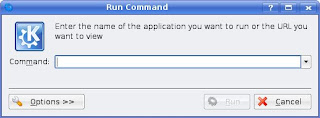
This will bring up the run command dialog. Type 'konsole' without the quotes and then hit the Run button.
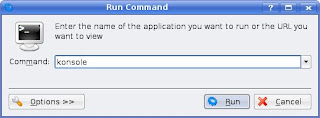
This will launch konsole, the KDE Terminal, and a new bash shell (the Bourne again shell, similar to MS-DOS, but more powerful).
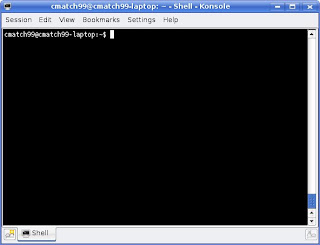
In the konsole, you now need to type a few commands to ensure the integrity of the Adept package database.
Step 1:
Update the repository database by entering the following:
sudo apt-get update
This will update the db, so please make sure you are connected to the internet when you do this. You may get a message at the end indicating additional commands to run. If you do, please follow this and enter those commands. Remember to prefix them with 'sudo' as they will require Admin rights to work.
For example, you may get a prompt that there was an error, and to run 'dpkg --configure -a'. If you do, this is what you would enter:
sudo dpkg --configure -a
If you have to run the reconfigure command, it is likely due to a package wanting to overwrite a file. In most cases it should be safe to hit 'y' to take the maintainers version. This should resoilve the conflict. If not, proceed with additional commands below
Step2:
You may need to run a check on the database, to ensure no broken dependencies. Run the following.
sudo apt-get check
This should be enough to get you back up and running.
To open a terminal, hit the following key sequence:
ALT+F2

This will bring up the run command dialog. Type 'konsole' without the quotes and then hit the Run button.

This will launch konsole, the KDE Terminal, and a new bash shell (the Bourne again shell, similar to MS-DOS, but more powerful).

In the konsole, you now need to type a few commands to ensure the integrity of the Adept package database.
Step 1:
Update the repository database by entering the following:
sudo apt-get update
This will update the db, so please make sure you are connected to the internet when you do this. You may get a message at the end indicating additional commands to run. If you do, please follow this and enter those commands. Remember to prefix them with 'sudo' as they will require Admin rights to work.
For example, you may get a prompt that there was an error, and to run 'dpkg --configure -a'. If you do, this is what you would enter:
sudo dpkg --configure -a
If you have to run the reconfigure command, it is likely due to a package wanting to overwrite a file. In most cases it should be safe to hit 'y' to take the maintainers version. This should resoilve the conflict. If not, proceed with additional commands below
Step2:
You may need to run a check on the database, to ensure no broken dependencies. Run the following.
sudo apt-get check
This should be enough to get you back up and running.
Monday, January 21, 2008
How many people have you converted to Linux
Ok, so I got to thinking... how do people get to know Linux, which distro do they go with any why? I guess, for many of the new users, it's whatever their friends, classmates, teachers, or place of business currently use. Over time, they may branch out and try alternatives, or stick within thier comfort zone.
Personally, I started a long time ago with Slackware. Of course, back in the early days, this was all distributed on 3.5' floppies, and I remember installing slackware from something like 30 floppies (circa 1993 I believe). Of course, things have come a long way since then, and now there are many Linux distros, each based on one of a handful of package management systems (deb, rpm, ebuild, tgz, etc).
Over the years, I have tried Red Hat, Mandrake/Mandriva, Debian, Gentoo and Kubuntu. Each of the distros have their own strengths, but for this time in my life, Kubuntu fits the bill nicely. Though, If I had to choose a distro for pure hacking and development, I would definately recommend Gentoo, as the ebuild system is top notch.
Anyway, getting back to the title of this post... how many people have you converted to linux? Well, for me, I'm sure I have sold various people over the years, which probably needed little to no coaxing. However, recently, I have begun trying to convert "non-geek" people to Linux, as in members of the common masses, who's only experience to date is point-n-stoopid from MS.
To date, I have successfully converted 8 non-technical windows people completely to Kubuntu. And when I say convert, I don't mean dual boot. I mean pure Linux only. I have to say, this has been pretty easy using Kubuntu, which has all the bells and whistles, and the recent Gutsy version has done a tremendous job on restricted drivers and media formats integration. In fact, so many things under KDE on Kubuntu are intuitive, that within weeks, I had friends showing me things I had not discovered.
So, share your experiences with conversion, good and bad, so we can learn from them.
Personally, I started a long time ago with Slackware. Of course, back in the early days, this was all distributed on 3.5' floppies, and I remember installing slackware from something like 30 floppies (circa 1993 I believe). Of course, things have come a long way since then, and now there are many Linux distros, each based on one of a handful of package management systems (deb, rpm, ebuild, tgz, etc).
Over the years, I have tried Red Hat, Mandrake/Mandriva, Debian, Gentoo and Kubuntu. Each of the distros have their own strengths, but for this time in my life, Kubuntu fits the bill nicely. Though, If I had to choose a distro for pure hacking and development, I would definately recommend Gentoo, as the ebuild system is top notch.
Anyway, getting back to the title of this post... how many people have you converted to linux? Well, for me, I'm sure I have sold various people over the years, which probably needed little to no coaxing. However, recently, I have begun trying to convert "non-geek" people to Linux, as in members of the common masses, who's only experience to date is point-n-stoopid from MS.
To date, I have successfully converted 8 non-technical windows people completely to Kubuntu. And when I say convert, I don't mean dual boot. I mean pure Linux only. I have to say, this has been pretty easy using Kubuntu, which has all the bells and whistles, and the recent Gutsy version has done a tremendous job on restricted drivers and media formats integration. In fact, so many things under KDE on Kubuntu are intuitive, that within weeks, I had friends showing me things I had not discovered.
So, share your experiences with conversion, good and bad, so we can learn from them.
Friday, November 2, 2007
Linux Printing...
It's been a while since I had to look at printing via Linux. But seeing as my old printer has given out, and I wanted to get a new color printer capable of printing photos, I figured it was time to go and buy one.
My last printer was a Lexmark z32, which worked fine under Linux. So, assuming that Lexmark was still supporting Linux, I went out and picked up a new Lexmark z1480... first mistake. I should have done some research.
So, after picking up the printer and spending an entire day trying to beat it into submission, I finally gave up, and returned it. But not before I wrote a letter to Lexmark (probably won't make a difference).
Anyway, I used to have a HP DesignJet years ago, and I remember that it was also supported under Linux. After doing some reading, I found that HP actually does support Opensource and Linux and they have a true full featured HP driver for Linux.
Armed with this information and new hope, I went to Open Printing to see which printers are supported by HP's driver under Linux. To my surprise, there were quite a few. A quick scan through the list and I find the one I want - a HP 6980. It's reasonably priced and includes Wireless.
I'm happy to say it was painless to setup. Basically, I followed the steps in the setup guide up to the point where I had to use the windows software. At that point, I instead ran the hp-setup utility under Linux (part of the HPLIP driver project).
Wow. Effortless.
I have to say I am impressed with the support HP has provided the community. Great job and hats of to them.
My last printer was a Lexmark z32, which worked fine under Linux. So, assuming that Lexmark was still supporting Linux, I went out and picked up a new Lexmark z1480... first mistake. I should have done some research.
So, after picking up the printer and spending an entire day trying to beat it into submission, I finally gave up, and returned it. But not before I wrote a letter to Lexmark (probably won't make a difference).
Anyway, I used to have a HP DesignJet years ago, and I remember that it was also supported under Linux. After doing some reading, I found that HP actually does support Opensource and Linux and they have a true full featured HP driver for Linux.
Armed with this information and new hope, I went to Open Printing to see which printers are supported by HP's driver under Linux. To my surprise, there were quite a few. A quick scan through the list and I find the one I want - a HP 6980. It's reasonably priced and includes Wireless.
I'm happy to say it was painless to setup. Basically, I followed the steps in the setup guide up to the point where I had to use the windows software. At that point, I instead ran the hp-setup utility under Linux (part of the HPLIP driver project).
Wow. Effortless.
I have to say I am impressed with the support HP has provided the community. Great job and hats of to them.
Friday, February 9, 2007
Linux Desktop Revolution...
I been recently helping out adding improvement patches to Gentoo's distribution via the Xeffects overlay.
Gentoo is a great Linux OS which is source based. Gentoo supports managing and creating an overlay which allows you to customize individual packages.
What does this mean? Well, when people are testing modifications and improvements to things like KDE, X, etc, you can take these patch files and make an overlay to test them one Gentoo as well.
Xeffects is such an overlay, and contains fixes to KDE, as well as other desktop improvements for Gentoo (like Beryl).
Beryl is a Revolutionary way to look at your desktop and shows exactly what Linux can achieve, which is far beyond anything Vista has to offer.
Beryl is an branch of Compiz, which was originally developed as a proof of concept by Novel. The source was released to the public, and it has developed beyond a simple proof of concent into a full blown replacement window manager.
Gentoo is a great Linux OS which is source based. Gentoo supports managing and creating an overlay which allows you to customize individual packages.
What does this mean? Well, when people are testing modifications and improvements to things like KDE, X, etc, you can take these patch files and make an overlay to test them one Gentoo as well.
Xeffects is such an overlay, and contains fixes to KDE, as well as other desktop improvements for Gentoo (like Beryl).
Beryl is a Revolutionary way to look at your desktop and shows exactly what Linux can achieve, which is far beyond anything Vista has to offer.
Beryl is an branch of Compiz, which was originally developed as a proof of concept by Novel. The source was released to the public, and it has developed beyond a simple proof of concent into a full blown replacement window manager.
Wednesday, February 7, 2007
Standards Compliance... why bother!
Ok, so we have all these standards bodies that are supposed to help make the playing field somewhat level and allow different software vendors to supply products that should work on all platforms.
Now, here we have M$ encouraging game vendors to adopt a DirectX 10 only approach to gaming...
1) DirectX 10 is proprietary and only runs on Vista, with no hope of a back port to XP or any other OS for that matter (not that we'd want their code bloat anyway).
2) Since it's not open source nor governed by any sensible standards body... see point # 1).
3) There already exists a great standard that allows games (and great ones at that) to run on (or easy to port to run on) just about any OS (Linux, Mac OS X, etc) - OpenGL
What I do not understand is why there isn't a bigger fuss. I guess if we were all well informed as a consumer base, then perhaps we would begin to ask the correct questions. Do I really need a new $500 video card to run this new game which requires DirectX? Of course you do... NOT. There isn't much OpenGL cannot do, that can't be done on pretty much any recent budget video card.
But that's not what M$ and the big Video Card vendors want you to believe. Is there some mutual benefit conspiracy happening here? "I make slow proprietary code that requires a super fast card... you make a super fast card to run my code"...
Now, here we have M$ encouraging game vendors to adopt a DirectX 10 only approach to gaming...
1) DirectX 10 is proprietary and only runs on Vista, with no hope of a back port to XP or any other OS for that matter (not that we'd want their code bloat anyway).
2) Since it's not open source nor governed by any sensible standards body... see point # 1).
3) There already exists a great standard that allows games (and great ones at that) to run on (or easy to port to run on) just about any OS (Linux, Mac OS X, etc) - OpenGL
What I do not understand is why there isn't a bigger fuss. I guess if we were all well informed as a consumer base, then perhaps we would begin to ask the correct questions. Do I really need a new $500 video card to run this new game which requires DirectX? Of course you do... NOT. There isn't much OpenGL cannot do, that can't be done on pretty much any recent budget video card.
But that's not what M$ and the big Video Card vendors want you to believe. Is there some mutual benefit conspiracy happening here? "I make slow proprietary code that requires a super fast card... you make a super fast card to run my code"...
In the beginning...
Back in the early 90's, a friend/co-worker introduced me to this new fangled thing called Linux.
Back then, it was distributed on 20-30 floppies, depending on what support you wanted to include. This was Slackware, and was pretty slick for the time.
My how things have evolved. Today, we have a multitude of Linux distributions, ranging from simple to down right complicated (at least for some).
Personally, I have used a variety of distributions ranging from Slackware, RedHat, Debian, Mandrake (Mandriva), Kubuntu and Gentoo.
My current liking is Gentoo, but I do not recommend it for the faint of heart. Instead, they should consider Kubuntu (my wife did and has not needed M$ since).
Back then, it was distributed on 20-30 floppies, depending on what support you wanted to include. This was Slackware, and was pretty slick for the time.
My how things have evolved. Today, we have a multitude of Linux distributions, ranging from simple to down right complicated (at least for some).
Personally, I have used a variety of distributions ranging from Slackware, RedHat, Debian, Mandrake (Mandriva), Kubuntu and Gentoo.
My current liking is Gentoo, but I do not recommend it for the faint of heart. Instead, they should consider Kubuntu (my wife did and has not needed M$ since).
Subscribe to:
Posts (Atom)